Use CRM data in campaigns
Smart values pull CRM data into your campaign emails, so each recipient gets a personally addressed message. Write the email once; 3Common fills in the details per recipient at send time.
Who this is for
Hosts who want campaigns that greet guests by name and reference their own data, without mail-merge spreadsheets.
Quick steps
- Compose a campaign from Marketing > Emails.
- In the email editor, type
{{where you want dynamic data. - Pick a token from the menu, for example the contact's first name.
- Check the live preview (tokens show sample data) and send a test.
What data is available
The {{ menu in the email editor only offers tokens the send can actually fill:
| Namespace | Example | Available |
|---|---|---|
| Contact | {{contact.firstName}} |
Always. First name, last name, email, phone, subscription status, and every custom contact property. |
| Segment | {{segment.gross_revenue}} |
When a segment is the audience. Every segment column becomes a token. |
| Event | {{event.name}} |
When the recipients include an imported event's attendees. Event name plus start and end times. |
| Generate | {{generate.uuid}} |
Always. Generated values like unique IDs. |
Contact and segment tokens resolve per recipient; event and generate tokens resolve once per send.
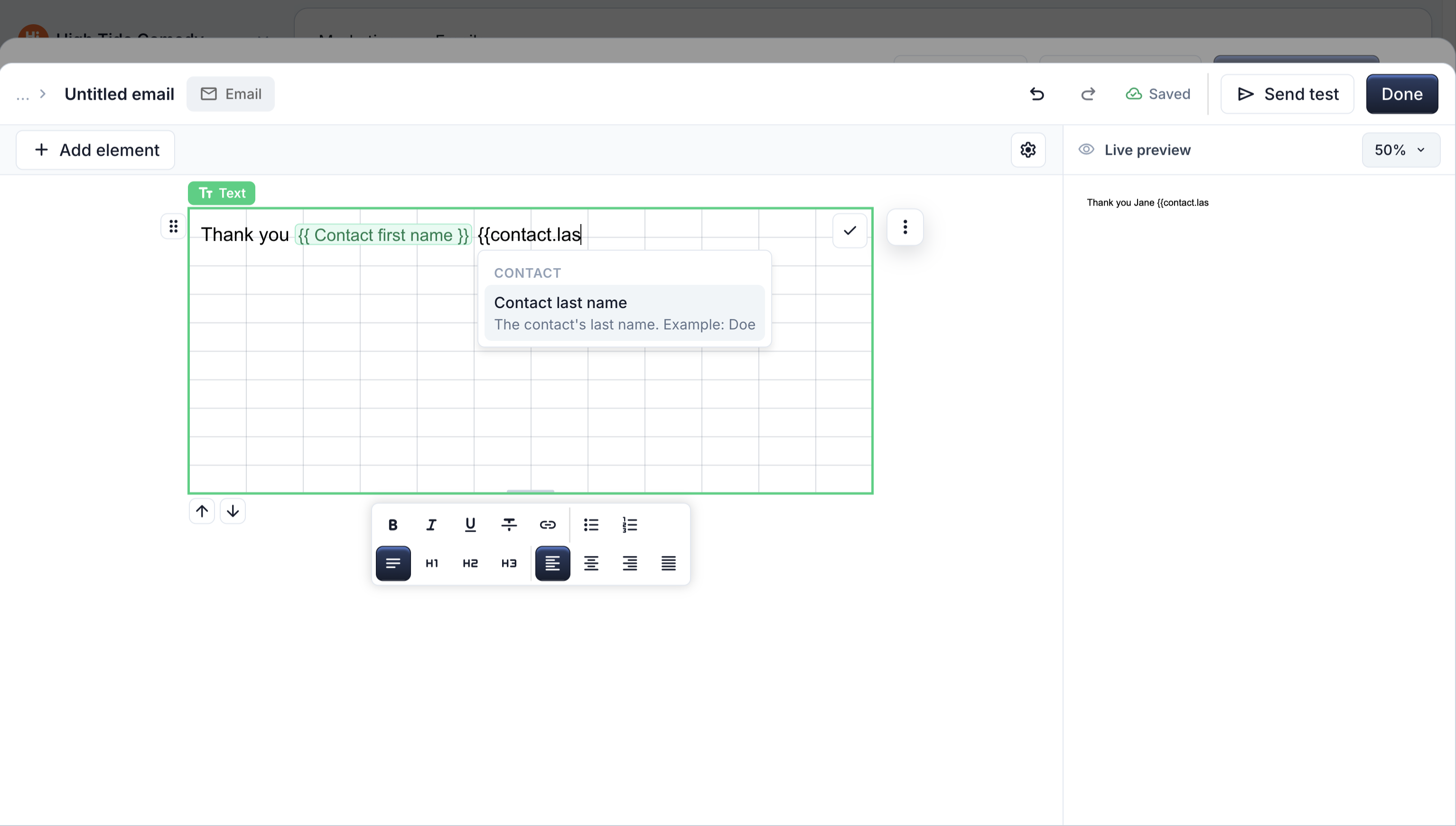
How to insert a smart value
- In the composer, click Open editor.
- Place the cursor where the value should go and type
{{. - Pick the token from the menu. For example:
Previews, tests, and missing data
- The Live preview and Send test fill tokens with sample data (or your own contact data where known), so the email always looks complete while you edit.
- In the real send, a token a recipient has no value for renders blank. Recipients never see the raw
{{...}}text.
Guarantee the data exists
If a token is essential to the message, make the audience guarantee it. For a segment audience, add a filter condition like "First Name is not empty" so every member has the value.
Troubleshooting
The token I want isn't in the menu
The menu only lists tokens the current send can fill. Segment tokens require a segment audience, and event tokens require an event audience: use Import emails > Segment or Event attendees first, then reopen the editor.
A recipient got a blank where the name should be
That contact has no value for the property. Fill the property in CRM, or filter the audience to members that have it.
Preview shows a name that isn't a real contact
That's sample data. Previews and tests substitute samples for missing values so you can judge the layout. Real sends use each recipient's actual data.