Identity Links
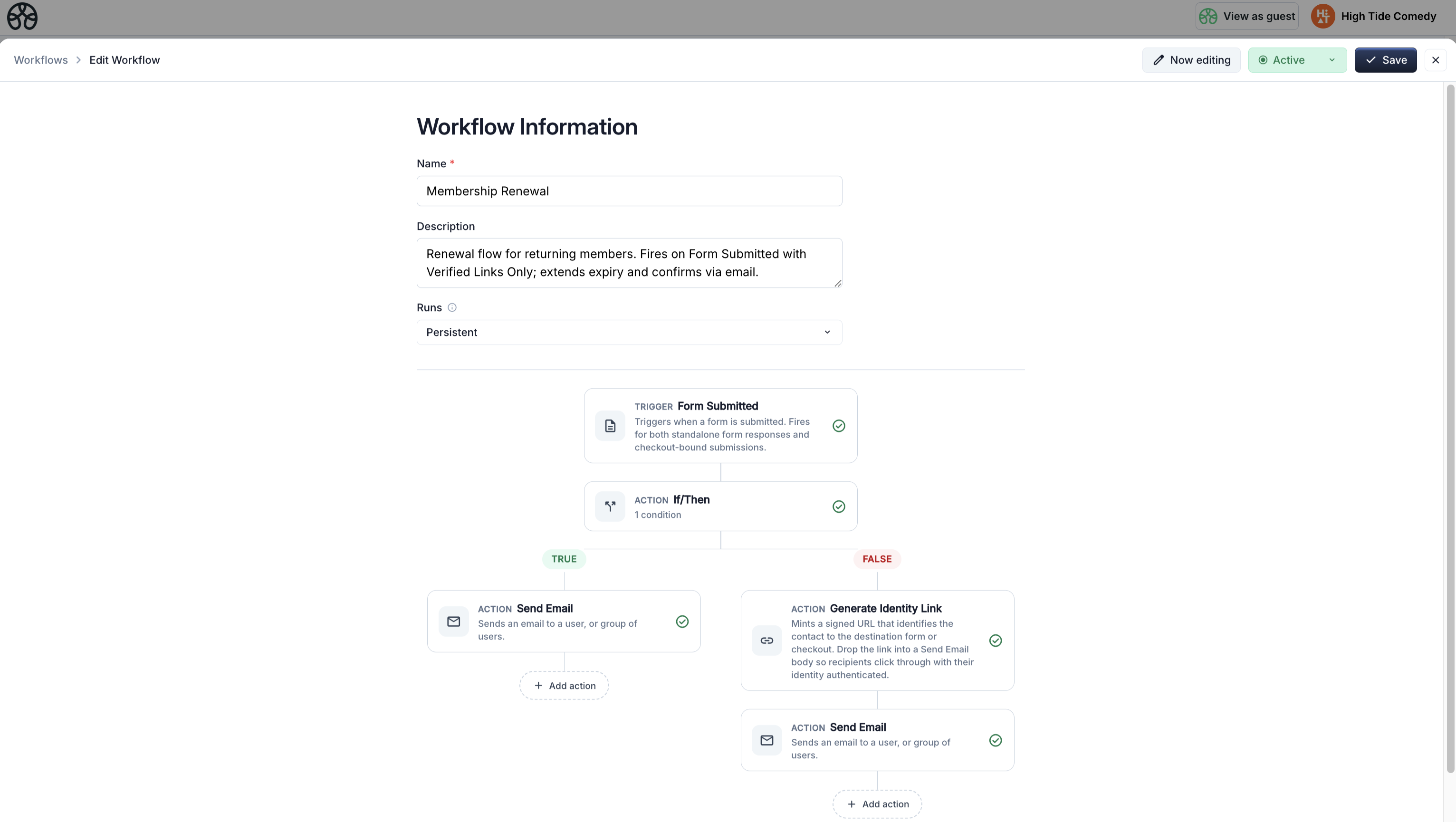
Identity Links are signed, single-purpose URLs that let your workflows prove who is on the other end of a form submission or checkout. When a member clicks through an Identity Link you generated for them and then submits a form or completes a purchase, the backend verifies the cryptographic signature and stamps identityVerified: true on the trigger — which downstream workflows can gate on.
Use them whenever an action would otherwise depend on trusting an email address that was typed at checkout. The canonical use case is membership renewals and cancellations, but the feature works for any flow where "the wrong contact got modified" is a real failure mode.
The problem they solve
Without Identity Links, a membership renewal workflow looks like this:
- You send Alice a renewal reminder email.
- Alice forwards the email to her husband Bob because he handles their accounts.
- Bob clicks through and pays — but at checkout he types his own email,
bob@example.com. - The
Product Purchasedtrigger fires withcontact.email = bob@example.com. - Your "extend expiry" action writes a new expiry date to Bob's contact record, not Alice's.
- Alice's membership quietly lapses. Bob now has a membership he didn't know he bought.
The root issue: the email Bob typed at checkout has nothing to do with the email Alice's renewal was minted for. Any workflow that updates contact-level properties based on a purchase is vulnerable to this.
Identity Links solve it by baking the target email into a signed token on the renewal URL. If Bob clicks through and pays, the backend verifies the signature, recovers the email the link was minted for (alice@example.com), and stamps that on the trigger. Your renewal workflow gates on Verified Links Only and uses {{signed.identity.email}} — the verified email — instead of the checkout-typed email. Bob's purchase either updates Alice's record (because that's who the link identified) or, if you prefer, doesn't fire the workflow at all.
How it works
An Identity Link is a normal URL with a single ?t=<token> query parameter appended. The token is a base64-encoded payload plus a signature:
The token carries, cryptographically bound:
- The vendor (owner) it was minted for — prevents cross-tenant replay.
- The email the link identifies.
- The canonical destination URL — a token for a checkout page can't be replayed against a cancellation form.
- An expiry (optional but recommended) — e.g. 30 days from mint.
When the recipient clicks through, the browser preserves the URL (including the token) in the Referer header of any subsequent form submit or checkout POST. The backend pulls the token out of the header, verifies the signature against the platform secret, and — if valid — stamps identityVerified: true plus the verified email onto the trigger params.
Why same-origin matters
The verification relies on the browser including the full URL (with ?t=...) in the Referer header. Browsers do this by default for same-origin requests — i.e. when the link's landing page and the form/checkout submit live on the same domain. Cross-origin links get the query stripped by the default Referrer-Policy, so the token never reaches the backend and verification silently fails. Keep the landing page and the action it leads to on the same domain.
The two pieces
Identity Links have two halves that you wire together in workflows:
The Generate Identity Link action
Mints a signed URL tied to a specific recipient email and destination page. Typically placed in a reminder or invite workflow — the output is a smart value that you drop into a Send Email action.
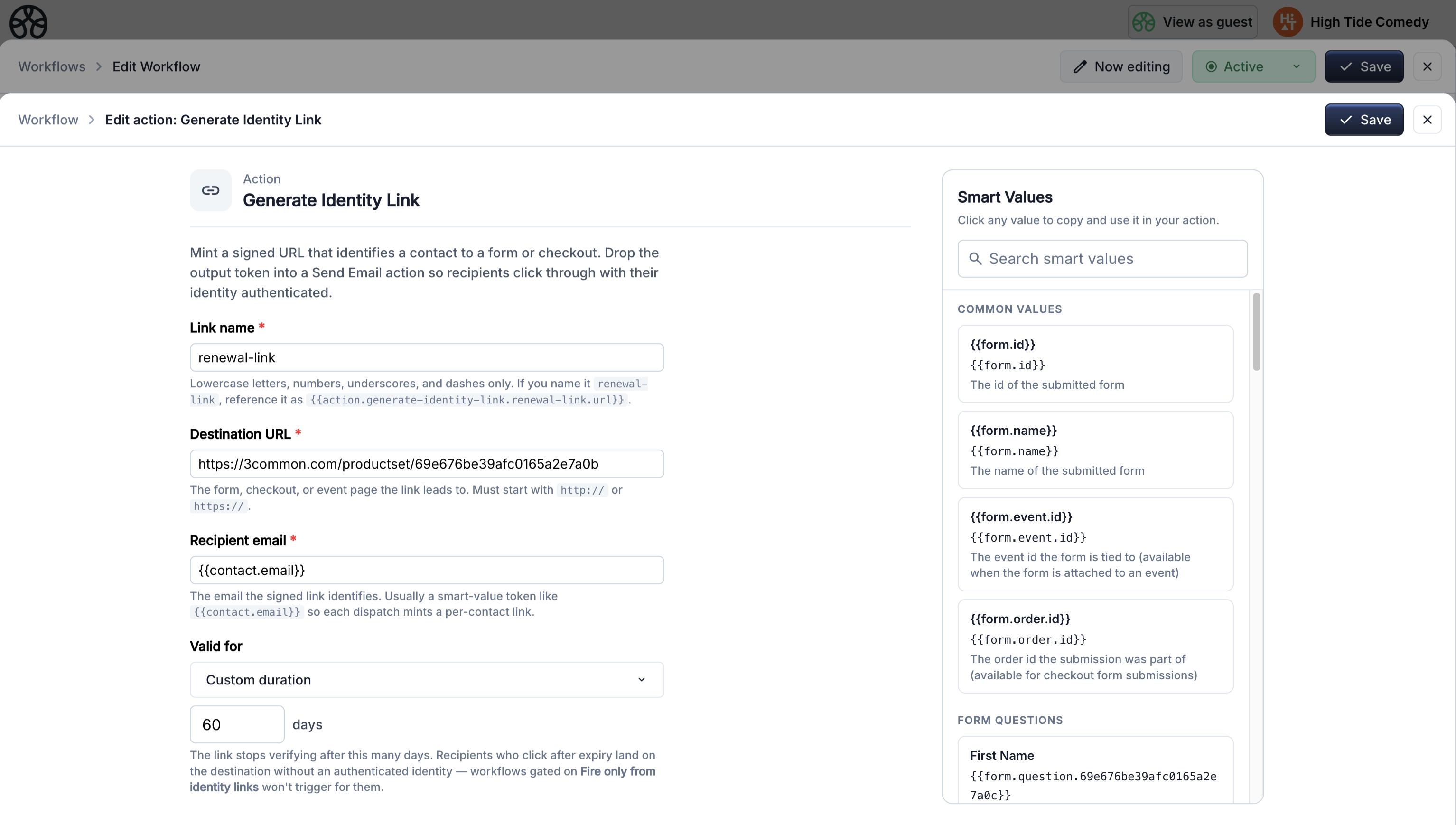
| Setting | Description |
|---|---|
| Name | Identifier for this action's output. Used as {{action.generate-identity-link.<name>.url}} in later steps. Must be unique within the workflow. |
| Target URL | The destination page — the landing page for the form or checkout the recipient will use. Must be on the same domain as the eventual form/checkout submit. |
| Recipient email | The email the link is bound to. Usually {{contact.email}}. This is the email your receiving workflow will see as {{signed.identity.email}} after verification. |
| TTL days | How long the link stays valid. Leave empty for no expiry. 30–90 days is typical for renewal reminders. |
Output: {{action.generate-identity-link.<name>.url}} — the target URL with the signed token appended.
The trigger's Identity Link option
Every trigger that supports Identity Links exposes an Advanced section with three options:
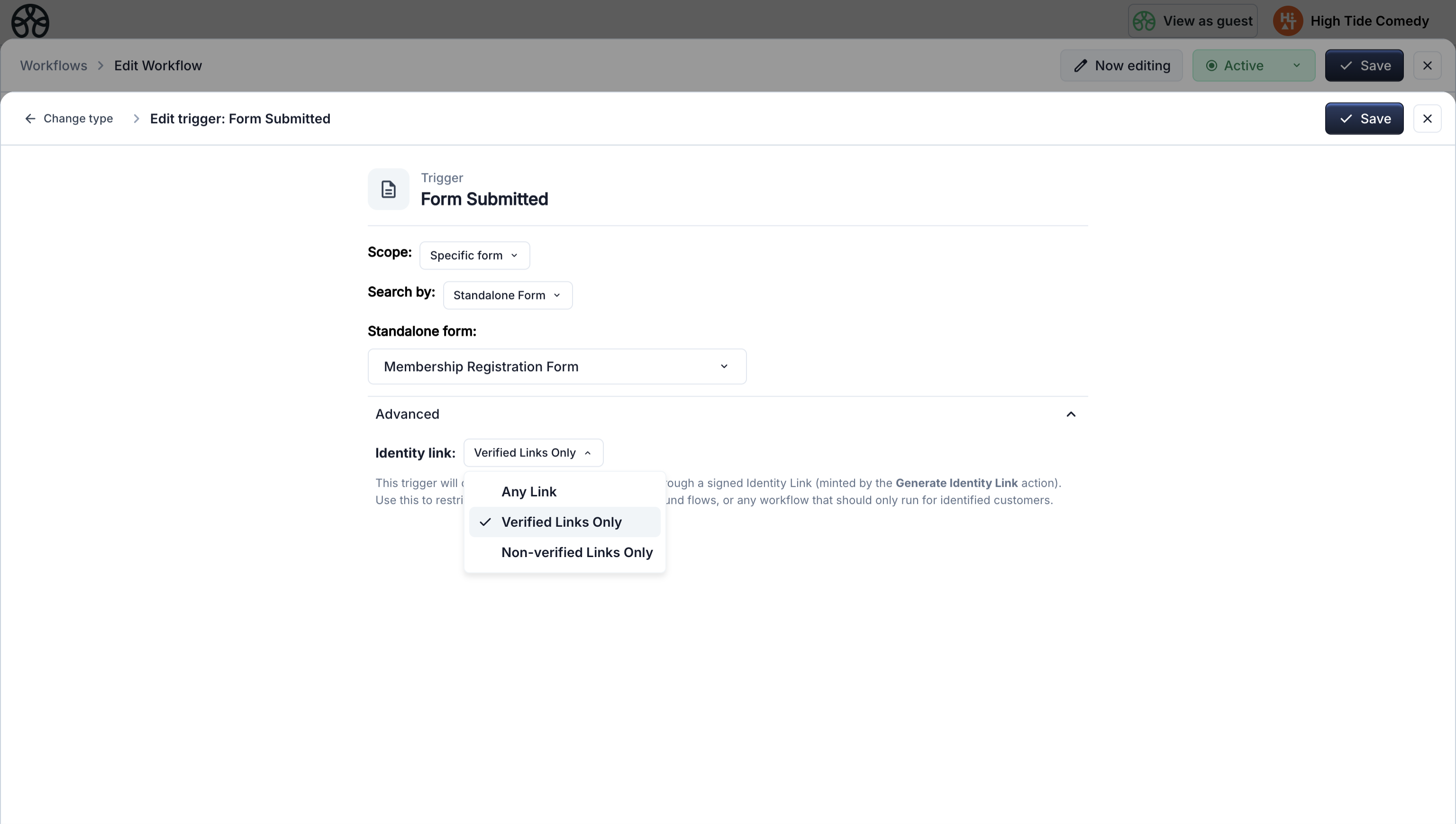
| Option | When the workflow fires |
|---|---|
| Any Link (default) | Every matching trigger, regardless of whether it came through a signed link. Behaves identically to pre-Identity-Link workflows. |
| Verified Links Only | Only when the submission came through a signed link that the backend verified. Use this for identity-sensitive actions — renewals, cancellations, account updates. |
| Non-verified Links Only | Only when the submission came through a public / anonymous path (no valid signed link). Use this to separate first-time-customer onboarding from returning-member flows. |
Triggers that support Identity Links:
- Product Purchased
- Order Made
- Form Submitted
- Item Sold Out
The renewal pattern
This is the canonical use case. Three workflows cooperate:
1. Reminder workflow — mint the link
Fires 30 days before a member's expiry. Generates a signed renewal link and emails it.
Trigger: Days Before Contact Date → Membership Expiry, 30 days before
  ↓
Action: Generate Identity Link
  - Name: renewal-link
  - Target URL: https://your-checkout.com/productset/<renewal-product-id>
  - Recipient email: {{contact.email}}
  - TTL days: 60
  ↓
Action: Send Email
  - Subject: Your membership expires in 30 days
  - Body: ...includes {{action.generate-identity-link.renewal-link.url}}
The email contains a "Renew now" button that links to {{action.generate-identity-link.renewal-link.url}}. When the member clicks it, they land on the checkout page with the token in the URL.
2. Renewal workflow — gate on verified
Fires when a membership product is purchased and the checkout was reached via a valid renewal link.
Trigger: Product Purchased
  - Product: <renewal-product-id>
  - Advanced → Identity link: Verified Links Only
  ↓
Action: Set Contact Property
  - Target: Membership Expiry
  - Value: A date 365 days from Membership Expiry
  - Contact email: {{signed.identity.email}}    ← verified, not checkout-typed
  ↓
Action: Send Email
  - To: {{signed.identity.email}}
  - Subject: Your membership has been renewed
Two things make this safe:
- Verified Links Only means the workflow won't fire at all unless the token verified — rules out direct-to-checkout purchases by a third party, and wrong-URL token replay.
{{signed.identity.email}}is the email baked into the signed token, not whatever was typed at checkout. Even if the clicker types a different email in the form, the contact record updated is the original member's.
3. New-member workflow — the complement
Fires when the same product is purchased without a signed link — i.e. a genuine new customer walking in off the website.
Trigger: Product Purchased
  - Product: <renewal-product-id>
  - Advanced → Identity link: Non-verified Links Only
  ↓
Action: Set Contact Property — generate Member ID
  ↓
Action: Set Contact Property — set Membership Status = Active
  ↓
Action: Set Contact Property — set Membership Expiry = 365 days from now
  ↓
Action: Send Email — welcome message
The two workflows share a trigger (same product) but split cleanly on identity state. You don't need an If/Then — the trigger filter does the routing.
The cancellation pattern
Cancellation has the same risk profile as renewal: if you trust the email typed on a cancellation form, anyone who gets forwarded the email or guesses a URL can cancel someone else's membership.
1. Mint a cancellation link on request
Triggered by a support request, a "Cancel" link in an account page, or a dashboard button. Mint an Identity Link pointing at a confirmation form.
Trigger: (your choice — a form submission, a webhook, a manual button)
  ↓
Action: Generate Identity Link
  - Target URL: https://your-site.com/forms/confirm-cancellation
  - Recipient email: {{contact.email}}
  - TTL days: 7
  ↓
Action: Send Email
  - Subject: Confirm your membership cancellation
  - Body: ...includes the signed link
2. Cancellation workflow — gate on verified form submit
Fires only when the confirmation form is submitted via the signed link.
Trigger: Form Submitted
  - Form: <cancellation-confirmation-form-id>
  - Advanced → Identity link: Verified Links Only
  ↓
Action: Set Contact Property
  - Target: Membership Status
  - Value: Cancelled
  - Contact email: {{signed.identity.email}}
  ↓
Action: Send Email
  - To: {{signed.identity.email}}
  - Subject: Your membership has been cancelled
Because the trigger requires a verified link and all property writes target {{signed.identity.email}}, the only member whose status can change is the one the cancellation link was minted for — regardless of who ultimately clicked it.
Limitations and caveats
Links carry identity, not authorization. An Identity Link proves "this click came from someone who received Alice's renewal email." It doesn't prove it's Alice personally — anyone with access to her inbox (family member, shared workstation, compromised account) can use the link. For high-stakes actions (large refunds, data export), require an additional authentication step.
Same-origin matters. The verification relies on the browser sending the full URL — including ?t=... — as the Referer header. Cross-origin navigations strip the query under the default Referrer-Policy. If your email links land on page-a.com but the form submits to page-b.com, verification will silently fail. Keep landing page and submit endpoint on the same domain.
Referer can be disabled. A small percentage of users run browser extensions or privacy-hardened configurations that strip the Referer header entirely. Those users will hit the "non-verified" path even on a valid link. If the workflow has a "Verified Only" trigger, their submission won't fire it — design a fallback path (e.g. a support contact email) for genuine members who can't get verified through.
Links are as good as the email inbox. Anyone with access to the inbox can use the link until it expires. Set a sensible TTL — 30–60 days for renewal reminders, 7 days for cancellation confirmations.
Links are tied to one destination. A token minted for /productset/abc won't verify on /productset/xyz or /forms/cancel. This is deliberate (prevents cross-purpose replay) but means a link with a stale or changed destination just won't verify.
Smart values
When a trigger fires with a verified identity, two smart values become populated:
| Token | Value when verified | Value when not verified |
|---|---|---|
{{signed.identity.verified}} |
true |
false |
{{signed.identity.email}} |
The email the link was minted for | empty string |
Use {{signed.identity.email}} for any identity-sensitive operation — it's the source of truth for "who is this submission actually from." Use {{signed.identity.verified}} in conditional branches when the workflow runs for both verified and unverified submissions but needs to branch on the distinction.
Quick reference
| Thing | Where |
|---|---|
| Mint a link | Generate Identity Link action |
| Gate a workflow on verified/unverified | Trigger Advanced → Identity link option |
| Reference the verified email | {{signed.identity.email}} |
| Reference the verified state | {{signed.identity.verified}} |
| Use the minted URL | {{action.generate-identity-link.<name>.url}} |
See the Membership system example for a complete end-to-end build using Identity Links for renewal and cancellation.