Customer portal
Every auto-charge subscription comes with a customer-facing portal URL. Customers can see their subscription status, payment method, and recent renewals — and cancel on their own — without signing in.
Who this is for
Hosts who want to understand what their customers see when they self-serve, and how to share the portal link.
What the customer sees
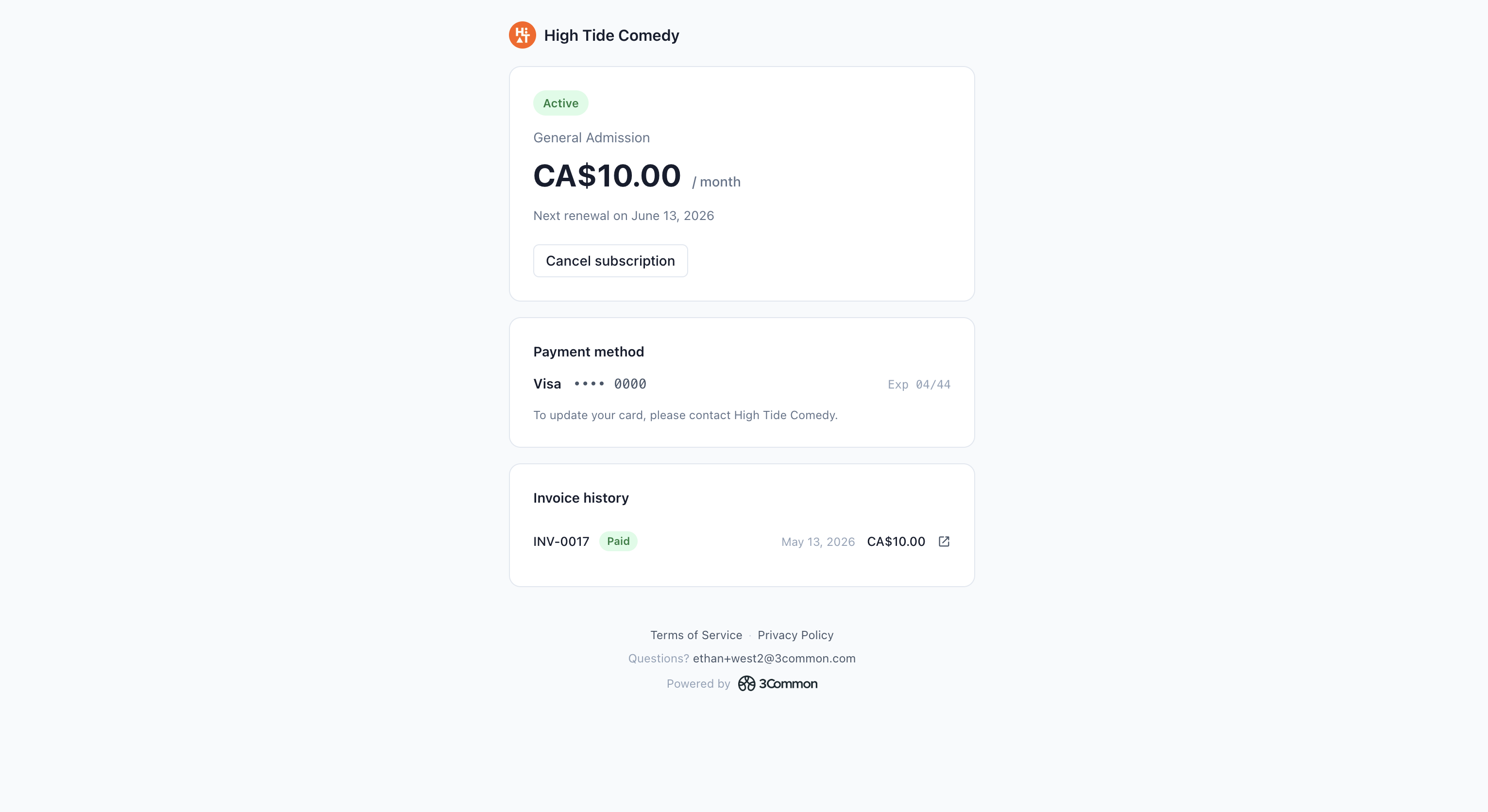
The portal is a single page tied to one subscription. It shows:
- Subscription status — Active, Trialing, Past due, etc.
- Next renewal — the upcoming renewal date and the amount they'll be charged.
- Saved payment method — card brand and last 4 digits only.
- Recent renewal invoices — the last several renewals with date, amount, and a link to the invoice's public page.
- Cancel subscription — schedules an end-of-period cancellation.
- Don't cancel — reverses a pending cancellation before it lands.
How customers reach the portal
The portal URL is non-guessable — every subscription has a unique token in its URL. Customers don't need an account or password; the token alone is the access credential.
Two ways customers get the link:
- In their receipt email. Every renewal receipt includes a link to the portal.
- From the host directly. You can grab the URL from the b2c side and share it with the customer if they need it again.
Treat the URL like a private link — anyone with it can see and cancel that subscription. If a customer's link is compromised, contact support to rotate their token.
Cancelling from the portal
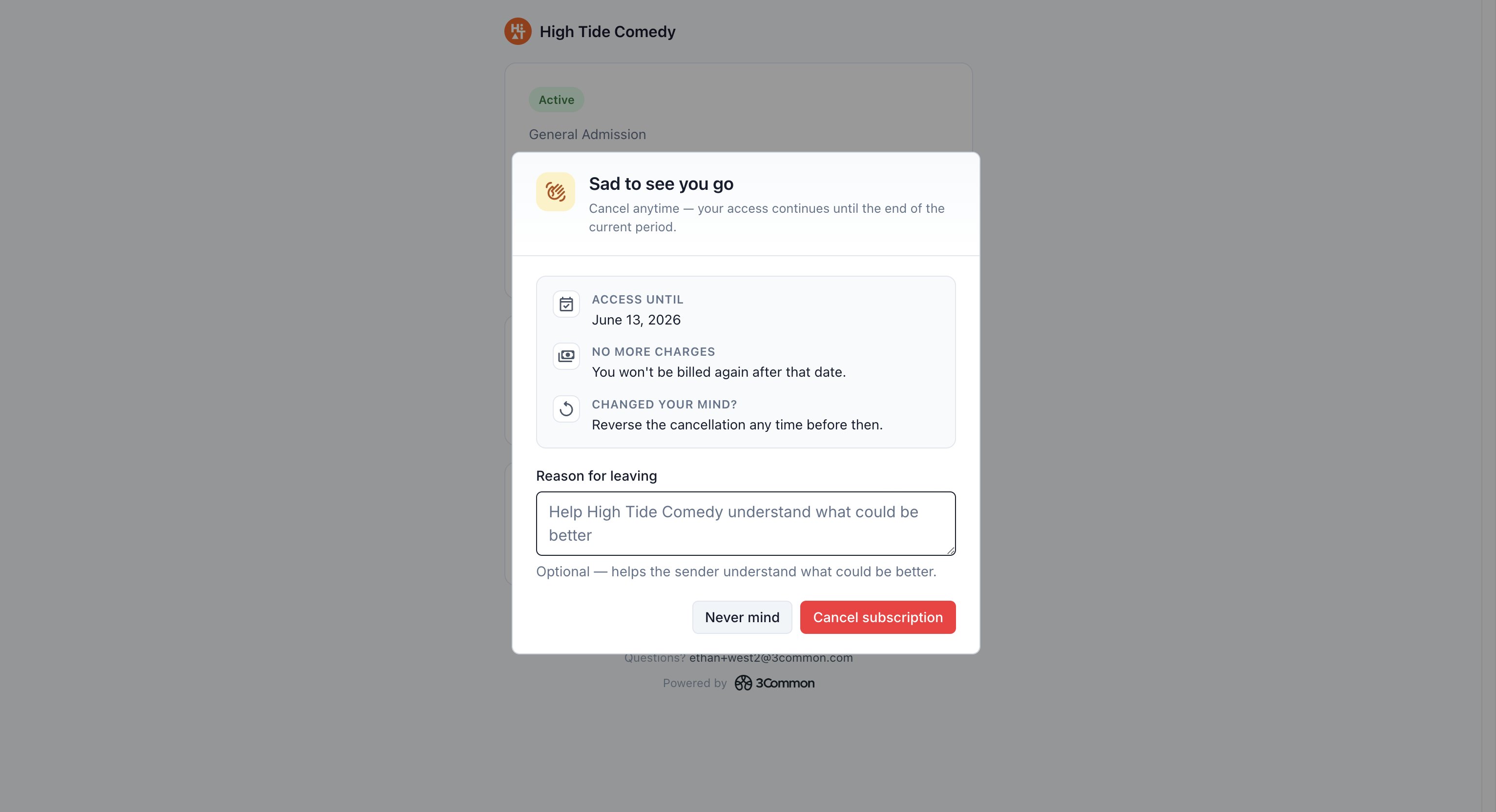
Customer cancellations from the portal are always end-of-period. The customer:
- Clicks Cancel subscription on their portal page.
- Confirms in the dialog.
The subscription stays Active through the rest of the current period and transitions to Canceled on the next renewal tick. The customer keeps access through the date they've already paid for.
Customers can't:
- Cancel immediately (only hosts can).
- Request a refund through the portal (they have to contact you).
- Update their saved card from the portal — that's display-only.
- Edit items, quantities, or other subscription details.
If a customer needs anything beyond cancel, they message you and you handle it from the host dashboard.
Manual-collection subscriptions don't get a portal
The self-service portal is auto-charge only. Manual-collection subscriptions don't have a portal URL because the customer already controls payment on each cycle by clicking (or ignoring) the payment-link email.
If a manual-collection customer wants to see their renewal history, share the renewal invoices from your end, or switch them to auto-charge so they get a portal going forward.
Troubleshooting
My customer says the portal link doesn't work
A few things to check:
- The subscription is canceled. Canceled subscriptions can still show a read-only view but some links may be gone depending on how long ago it ended.
- They copied the URL incompletely. The token at the end of the URL is part of the address — if it got truncated by an email client or chat app, the link won't open. Re-share from the side-peek's Copy action.
- The subscription is manual collection. Manual subs don't have a portal. Confirm the collection mode on the side-peek.
I want to disable a customer's portal access
There's no per-customer toggle. The pragmatic option: cancel the subscription (if you're ending the relationship), or contact support to rotate the portal token so the old URL stops working.
Can I customize what's shown on the portal?
Not currently. The portal shows a standard set of fields and is the same for every host's customers. Branding and content customization aren't available yet.
Will the customer see their tax ID / our tax ID on the portal?
The portal itself doesn't show tax IDs — those appear on the renewal invoice PDFs the customer downloads. If the customer needs your tax ID, they'll find it on any renewal invoice they download from the portal.