Cancellation
Two ways to cancel a subscription, plus an option to refund the last payment as part of the cancellation. If you change your mind before an end-of-period cancellation actually lands, you can resume the subscription and keep it going.
Who this is for
Hosts ending a customer's recurring billing, whether by host decision or in response to a customer request.
Choose how the cancellation lands
When you cancel, the platform gives you two options:
| Option | What happens |
|---|---|
| Cancel immediately | The subscription goes to Canceled right now. No future renewals will run. The customer loses access on the spot. |
| Cancel at period end | The subscription stays Active until the current period ends, then transitions to Canceled on the next renewal tick. The customer keeps access through their paid-up date. |
End-of-period cancellation is the friendlier option for customer-initiated cancellations — they keep what they've paid for. Immediate cancellation is for cases where access needs to stop right away (refund-and-revoke, terms violation, fraud, etc.).
Step-by-step (host)
- Open the subscription from the Subscriptions dashboard.
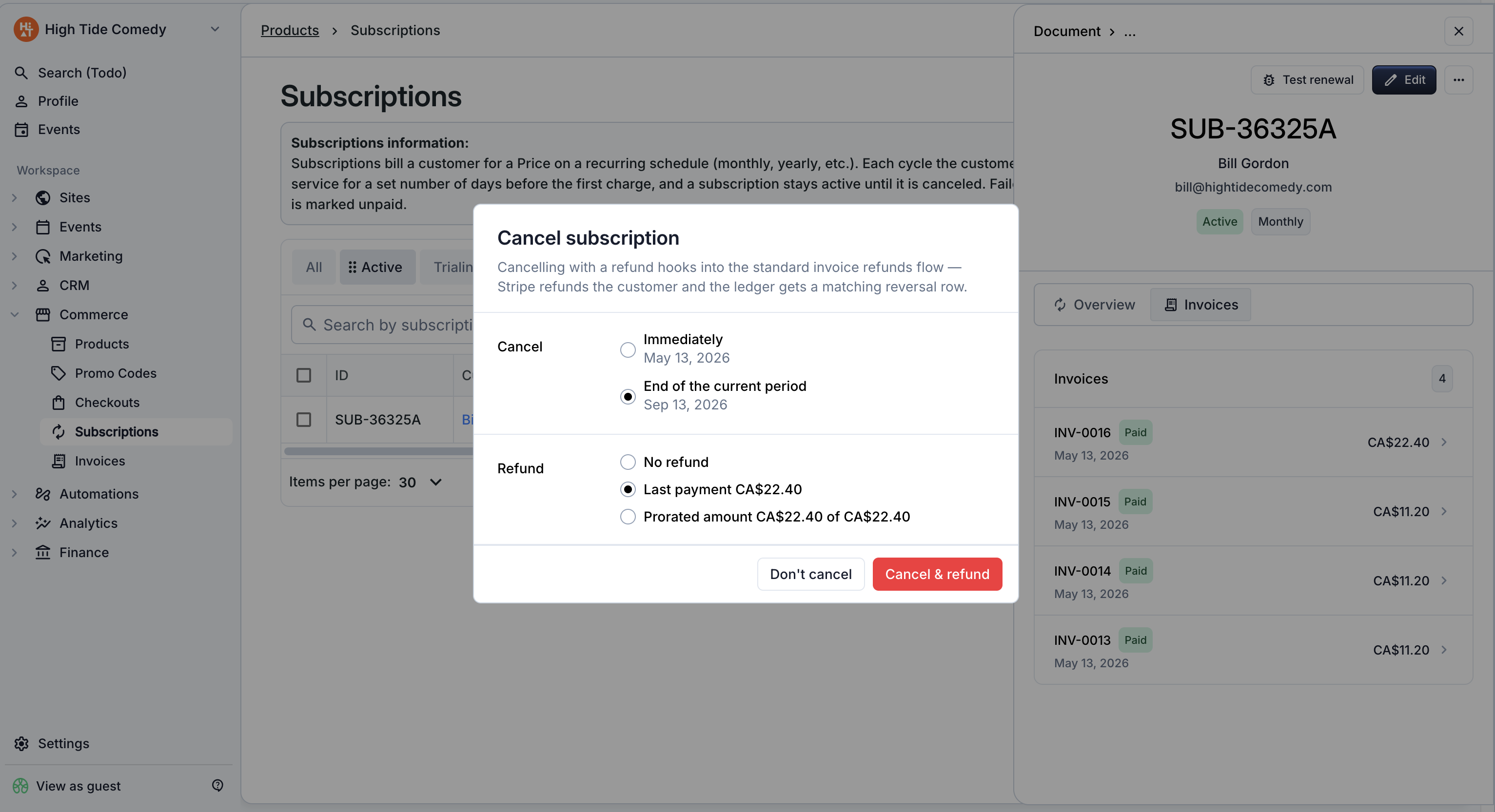
- Click Cancel subscription in the side-peek's action menu.
- Pick immediate or at period end.
- (Optional) Choose a refund:
- None — cancel without refunding anything.
- Last payment — refund the most recent renewal in full.
- Prorated — refund the unused portion of the current period.
- Confirm.
Refund options in detail
- None — the subscription ends, no money moves. Use this when the customer has already received the full value of what they paid for (most common for end-of-period cancellation).
- Last payment — refunds the most recent renewal payment in full. Use this when the customer asks to cancel and you want to return the cycle they're currently in. The refund follows the normal refund flow — funds come from your connected payout balance.
- Prorated — refunds the unused portion of the current period based on days remaining. Use this when the customer is cancelling partway through a period and you want to be fair about the remaining days. The refund amount is calculated automatically.
Refund balance applies the same way
Refunds issued as part of cancellation are pulled from your payout balance. If your balance is too low (recently paid out, payment not yet settled), the refund won't go through until balance is available. See Refunds for the full note.
Customer-initiated cancellation
Customers on auto-charge subscriptions can cancel themselves through the self-service portal. Customer cancellations always schedule as end-of-period — they keep access through the date they've already paid for, and no refund is issued.
You'll see customer-initiated cancellations on the dashboard as subscriptions with the "cancel at period end" flag set. The subscription stays Active until its period ends.
Manual-collection subscriptions don't have a customer-facing cancellation flow — those customers just stop paying when they're done, or message you to cancel on their behalf.
Resuming a scheduled cancellation
If a subscription is scheduled to cancel at period end and you (or the customer) change your mind, you can resume it before it actually ends.
Step-by-step
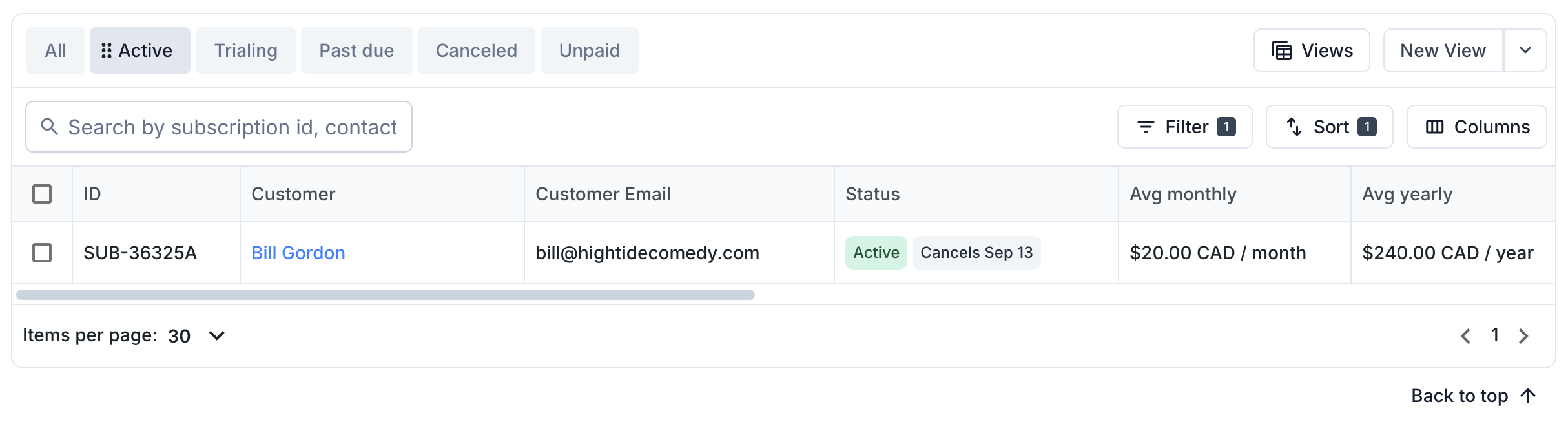
- Open the subscription from the dashboard. Subscriptions with a pending cancellation show a Cancels on … chip next to the status chip in the side-peek header.
- Click Don't cancel in the action menu.
The "cancel at period end" flag is cleared. The subscription continues renewing on its normal cadence.
You can't resume a subscription that's already fully canceled (immediate cancel, or end-of-period cancel that's already passed). To restart billing for that customer, create a new subscription.
What cancellation does NOT do
- It doesn't delete the subscription. The subscription stays in the dashboard under the Canceled filter for historical reference.
- It doesn't invalidate already-issued tickets. If the customer was issued tickets on past renewals, those tickets remain valid. To invalidate, contact support with the specific ticket records.
- It doesn't refund automatically unless you select a refund option during cancellation. Cancellation and refund are separate decisions.
- It doesn't notify the customer automatically. The customer doesn't get a "your subscription was canceled" email by default. If they need to know, message them out-of-band (or include a refund, which does generate a Stripe refund notification).
Troubleshooting
I canceled immediately when I meant to cancel at period end
Immediate cancellation isn't reversible. To restore the customer's access, create a new subscription on the same items when they're ready to resume.
The refund failed during cancellation
The subscription cancels regardless of refund success or failure — cancellation and refund are two separate operations. If the refund failed (usually a balance issue), you can retry it from the customer's last renewal invoice. See Refunds troubleshooting.
Can I cancel an Unpaid subscription?
Yes. Cancel directly from the side-peek — the subscription moves to Canceled and no further dunning runs. No refund option is offered since no recent payment was successful.
Does cancellation refund tickets the customer already used?
No. The refund returns money; it doesn't touch the ticket records or the events the customer attended. Cancellation + refund is purely a money operation. If you also need to invalidate tickets they haven't used yet, contact support.